GeoPackage is an open data format that was first published in 2014. It follows OGC standards (Open Geospatial Consortium) and has a whole set of qualities that make it better than the old, now outdated shapefile format.
Before looking at GeoPackage in more detail, let us go over the reasons why the shapefile format MUST be abandoned. There is a very telling article online, Switch from Shapefile, which I recommend reading. That article lists many of the problems connected with shapefiles. Below I will limit myself to some of the most common ones that I have personally encountered:
- The name of an attribute-table field cannot contain more than 10 characters. Personally I find it very annoying to have to truncate column names! If I want to call a field
surfaces_in_evolution, with the shp format I am forced to write something like surf_in_evo. Ugly to look at, ugly to read, and ugly to manage when building legends both in the table of contents and in print layouts.
- Text fields cannot exceed 255 characters. There are many cases in which 255 characters are far too few. For the creation of a geological map, for example, when you need to describe the type of geological unit, 255 characters are restrictive. One imperfect solution I have sometimes adopted is creating an external table with the longer texts and then joining it to the shp. That means adding yet another file to the already long list of files associated with a shapefile, increasing the chance of partial copies when the data need to be sent to other people. You also have to send the project file so that the join between the external and internal tables is not lost.
- It is not possible to set a character encoding. Have you ever worked with data in a different language? Not necessarily Chinese or Arabic. Even French can become painful! Unreadable characters, a disaster.
- The shapefile is not a topological data format! This means that the geometries generated are not topological, so you may run into errors, for example, during geoprocessing. Here is a recent experience of mine.
I had a shapefile full of invalid geometries. I imported it into PostGIS and made it topological with the ST_MakeValid function. When I exported it back to shp, it was no longer topological. I then exported it from PostGIS to SpatiaLite and it was correct there as well. As a further test, I exported it from SpatiaLite to shp and again ended up with a vector layer containing invalid geometries. - It creates problems with dates. Shapefiles do not support the DateTime format, only Date, so you can store 20/02/1998 but not 20/02/1998 15:00.
For a GIS professional, these should already be enough reasons to say goodbye to the shapefile. The article I linked contains many more.
Now let us come to GeoPackage. It is a very flexible geographic data format that can contain both vectors and rasters. In fact, this format is a data container based on SQLite. This gives us many advantages.
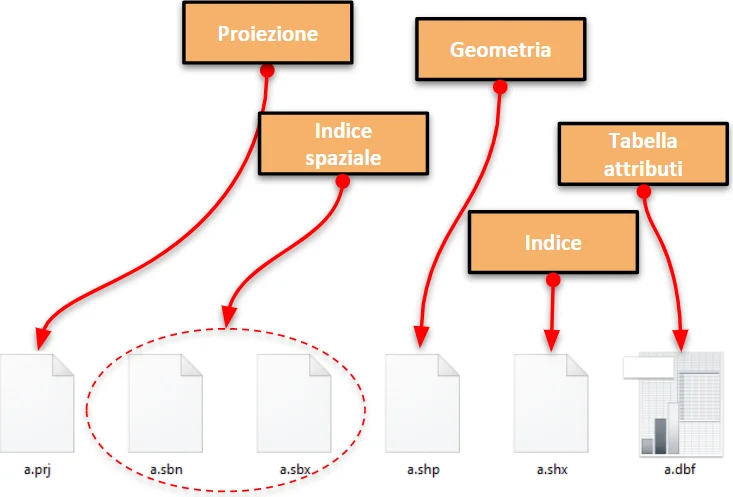
ALL IN ONE. GeoPackage can contain geometries, the attribute table associated with those geometries, topology, the coordinate reference system of the layer, and even symbology. The shp format needs at least six files to do almost the same thing.
Because it is based on SQLite, we can write our field names in full without trouble. If the field is textual, there is no character limit, so very long texts can be stored without difficulty. Since the format fully follows OGC standards, it offers maximum freedom of use and interoperability across software platforms. It can also store more than 2 GB of data, which a shapefile cannot do.
A few months ago a poll was launched on Twitter about switching away from the shp format, and GeoPackage was chosen as the best replacement, ahead of GeoJSON.
https://t.co/6JZZRiP8q5 featuring two formats as @shapefile replacement. Which do you prefer? #switchfromshapefile #geojson vs. #geopackage
- Jachym Cepicky (@jachymc) October 5, 2017
Another interesting aspect of GeoPackage is that it can contain rasters. With QGIS it is very easy to convert a .tiff into a .gpkg (the GeoPackage extension): a simple format conversion is enough.
Given all these advantages, why not switch to the .gpkg format?