
Some time ago I made a video explaining why is It is important to respect the topological rules. But what if we have a vector that is plagued by problems on all or some of its geometries?
In this article I will explain how you can correct a particular type of topological problem, which I would say is quite difficult when encountered, namely the Self-intersection. This type of error is often generated by double clicking when positioning the last node of a geometry, or it happens to be generated when arcs of the same geometry intersect.
Sometimes they are accidental errors caused by haste, others are "imprinting errors, as I define them, that is, those GIS data management errors caused by the transition from the CAD to the GIS environment. For example, in a CAD you complete the creation of a line with a double left click, while in a GIS environment you position the last known one with a left click and with a subsequent right click you stop editing the geometry. This applies to both a linear and a polygonal vector.
When you generate a Self-intersection in a geometry it doesn't matter whether you have activated topological editing, that point or those points will always give pointing problems and you will be forced to correct them before proceeding because it otherwise you risk having to throw away all your work.
A few years ago I came across this problem while collaborating with a person who, due to imprinting errors, very often generatedSelf-intersection. I received the quick error resolution from Andrea Peri on GFoss. You never stop learning and it happens that you don't have the solution to a problem, but fortunately there are technical forums where you can find the solution. It is possible to receive help from older people. experts willing to share their skills.
Having done this initial work, let's move on to the practical part. Userò
Functions
The PostGIS functions involved in this article are:
- ST_Multi
- ST_CollectionExtract
- ST_ForceCollection
- ST_MakeValid
- ST_IsValid
ST_Multi generates multiple geometries such as MultiPolygon or MultiLineString. These are different geometries from simple Polygon and LineString because they are they are composed of non-contiguous elements. Polygonal vector image of Italy with the major islands. It will be composed either of three polygons: continental Italy, Sicily and Sardinia, which together will compose a Polygon-type vector, or it will be a vector with a single polygonal geometric element of type MultiPolygon. In the latter case the polygons representing the major islands are not contiguous. with continental Italy but are part of the same multipolygonal geometric element which in turn belongs to the Italy vector. Having said this, you will have guessed that ST_Multi is not fundamental for the process that I will explain to you soon because it is should only be used if you are using a "Multi" type vector.
ST_CollectionExtract è a function that extracts certain types of geometries from a vector of type GeometryCollection. In fact, the function gives the possibility to assign a number, from 1 to 3, which represents the type of geometry we are interested in. For example, if our vector contains both lines and polygons using the value 3 the function will extract only the polygons, with 2 it will extract just the lines.
ST_ForceCollection è a function that forces the geometry to be a GeometryCollection. Combined with the previous function it is a kind of check, a verification, that the geometries treated are of the GeometryCollection type and if they are not, then they are forced to be so.
ST_MakeValid è the function that cleans geometries affected by Self-intersection.
ST_IsValid è a function that returns Boolean values True or False if the analyzed geometry is correct from a topological point of view.
Query
The previously seen functions, united in a query, allow us to clean up our vector and therefore be able to use it for our needs.
We can use the previous functions both to create a "clean" copy of our vector, and to directly clean the vector we are working on.
New correct vector
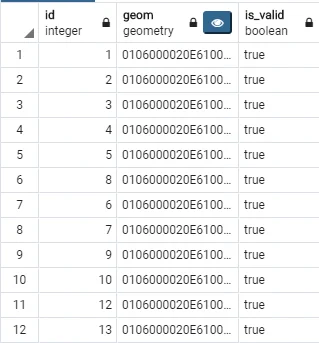
CREATE TABLE cleaned_polygons AS
SELECT
 id,
 ST_Multi(ST_CollectionExtract(ST_ForceCollection(ST_MakeValid(geom)),3)) as geom,
 ST_IsValid(ST_Multi(ST_CollectionExtract(ST_ForceCollection(ST_MakeValid(geom)),3))) as is_valid
FROM polygon_source;
The previous query creates the correct vector cleaned_polygons from polygon_source; the is_valid column is It was added only for final verification and may be eliminated without problems.
Corrected original vector
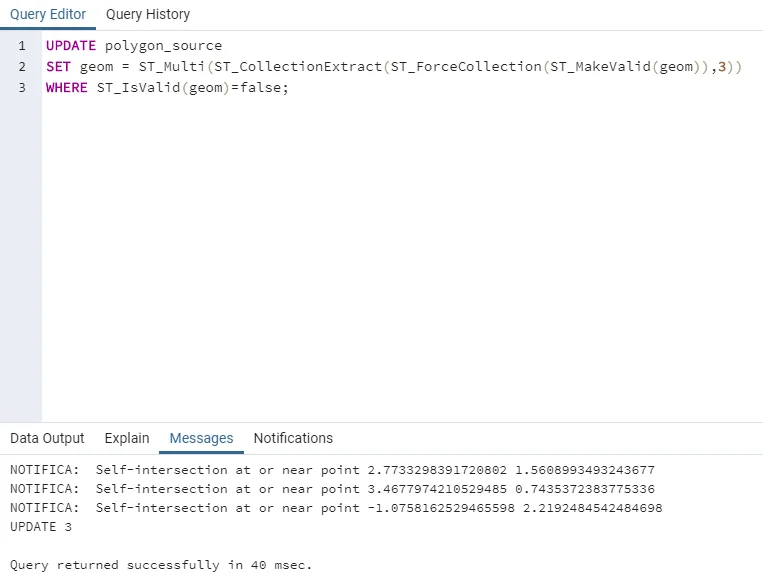
UPDATE polygon_source

SET geom = ST_Multi(ST_CollectionExtract(ST_ForceCollection(ST_MakeValid(geom)),3))

WHERE ST_IsValid(geom)=false;
The previous query directly updates the original vector,polygon_source, correcting its geometries.
In the following video you will find the entire process.